FOR HEALTHCARE IT CAREERS

Bridge the gap between healthcare data and IT careers.

Workflow-driven HL7 v2 and Mirth Connect training where every student gets a real interface engine, a live database, and an auto-grader — plus a development foundations course in the JavaScript, SQL, and XML that integration work is made of.

0lessons across 2 courses
0quiz questions
0hands-on labs + capstone
EMR sends ADT^A04 MIRTH CHANNEL Source Filter Transformer Destination patients ACK travels back to the sender
MSH|^~\&|REGISTRATION|CITYHOSP|MIRTH|LAB|…|ADT^A04|MSG10001|P|2.3  ACK AA

Two courses, one goal: interfaces you can build

The flagship HL7 program and a broader development foundations track — take them together or in sequence. Every lesson is written for integration work, not textbook theory.

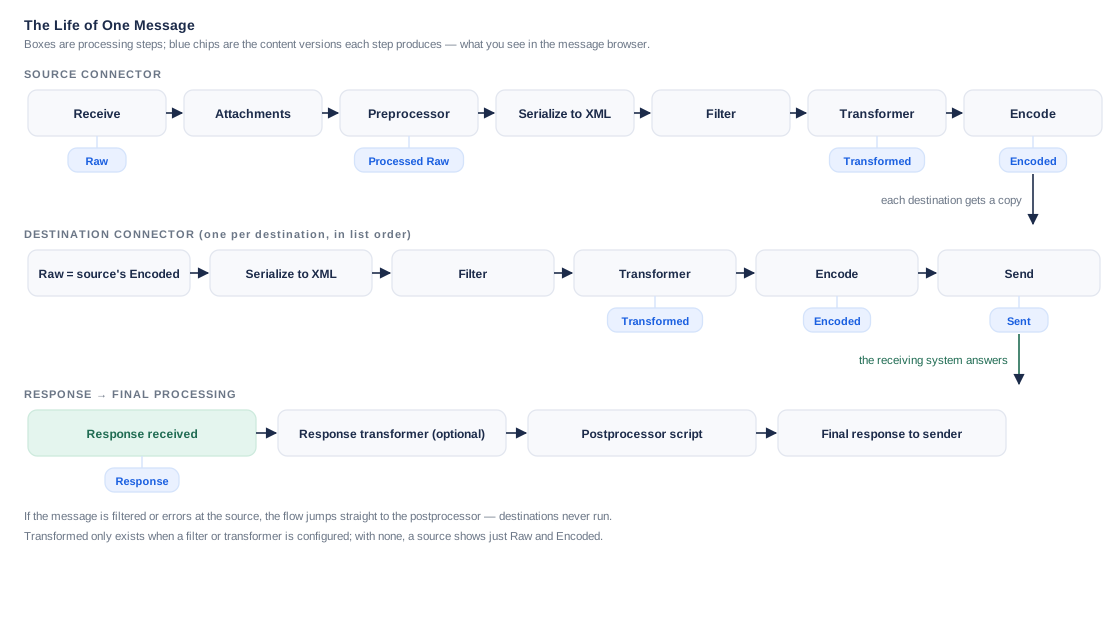
Preview diagram from the course: the life of one message through a Mirth channel
HL7 v2 · FLAGSHIP

HL7 Bridge Training

Read HL7 v2 fluently, build real interfaces in Mirth Connect, and prove it against a live database — admitting a patient, routing a referral, and closing the loop on a pharmacy order.

6 modules66 lessons 9 quizzes · 249 questions 3 labs + capstone buildBeginner-friendly
CURRICULUM PREVIEW
01Healthcare Interoperability & HL7 v2 Data Formats 21 lessons
  • Introduction to Healthcare Interoperability: Interoperability
  • Introduction to Healthcare Interoperability: Why Standards?
  • Introduction to Healthcare Interoperability: How Standards Support Interoperability
  • Introduction to HL7 Version V2.x: What is Health Level 7
  • Introduction to HL7 Version V2.x: Communication Environment
  • Introduction to HL7 Version V2.x: What is HL7 V2.x?
  • HL7 Version V2.x: What This Book Covers
  • HL7 Version V2.x: HL7 Message Basics
  • HL7 Version V2.x: HL7 v2 Message Elements
  • HL7 Version V2.x: Data Types
  • HL7 Version V2.x: HL7 V2.x Message Processing Rules
  • HL7 Version V2.x: Acknowledgement of Message Reception (ACK)
  • HL7 Version V2.x: Additional Reference Material
  • Patient Admin & Orders/Results: What This Book Covers
  • Patient Admin & Orders/Results: Introduction
  • Patient Admin & Orders/Results: Patient Administration
  • Patient Admin & Orders/Results: Trigger Events and Associated Messages
  • Patient Admin & Orders/Results: ADT Main Segments
  • HL7 – Message Control Segments
  • Introduction to HL7 CDA
  • IHE Profiles
  • QuizLevel 1 Quiz — HL7 v2 Data Formats · 45 questions
  • Deep Dive QuizDeep Dive Quiz — IHE Profiles & CDA · 54 questions
02Mirth Connect Foundations 22 lessons
  • Intro: Integration/Interface Engines Introduction
  • Transport Protocols
  • Meet Mirth Connect: Introduction to Mirth Connect
  • The Mirth Layout: Dashboard
  • The Mirth Layout: Channels
  • The Mirth Layout: Source
  • The Mirth Layout: Destinations Tab
  • The Mirth Layout: Scripts
  • The Mirth Layout: Deployment
  • The Mirth Layout: Channel Messages
  • The Mirth Layout: Summary
  • Mirth Fundamentals: Data Types and Serialization
  • Mirth Fundamentals: Message Processing
  • Mirth Fundamentals: Message Templates
  • Mirth Fundamentals: Filters
  • Mirth Fundamentals: Filter Types
  • Mirth Fundamentals: Transformers
  • Mirth Fundamentals: Transformer Types
  • Mirth Fundamentals: Practice — Warm-ups for the Labs
  • Setup & Installation
  • Accessing Your Mirth Environment
  • Lab A — Get the patient across
  • QuizLevel 2 Quiz — Mirth Connect Foundations · 29 questions
  • Deep Dive QuizDeep Dive Quiz — Transport, OSI & Connectors · 10 questions
03Developing & Transforming Data 16 lessons
  • XML & the HL7 Message Model: Why This Matters
  • XML & the HL7 Message Model: The Message as a Tree
  • XML & the HL7 Message Model: Reaching a Field
  • XML & the HL7 Message Model: Bridge to the Labs
  • JavaScript for Integration: Variables — Capturing a Field
  • JavaScript for Integration: Conditionals — Making Routing Decisions
  • JavaScript for Integration: Strings — Reshaping Data
  • JavaScript for Integration: Loops — Handling Repeats
  • JavaScript for Integration: Functions & Code Templates — Reuse
  • JavaScript for Integration: Bridge to the Labs
  • SQL for Integration: Why SQL Here
  • SQL for Integration: INSERT — Delivering a Message to a Table
  • SQL for Integration: SELECT + WHERE — Verifying and Finding
  • SQL for Integration: UPDATE — Changing State
  • SQL for Integration: JOIN — Reconciling a Workflow
  • Lab B — Route it and reshape it
  • QuizLevel 3 Quiz — Development · 39 questions
  • Deep Dive QuizDeep Dive Quiz — Mirth Transformers & Filters · 14 questions
04Advanced Mirth & Bidirectional Workflows 4 lessons
  • Maps
  • Global Scripts
  • Code Templates
  • Lab C — Close the loop
  • QuizLevel 4 Quiz — Advanced Mirth & Bidirectional Workflows · 20 questions
05Delivering Integration Projects 2 lessons
  • Project Management
  • Applying It: Plan the Delivery of a Workflow
  • QuizLevel 5 Quiz — Delivering Integration Projects · 13 questions
06Capstone 1 lessons
  • Capstone: Build Challenge
  • QuizCapstone Written Exam · 25 questions
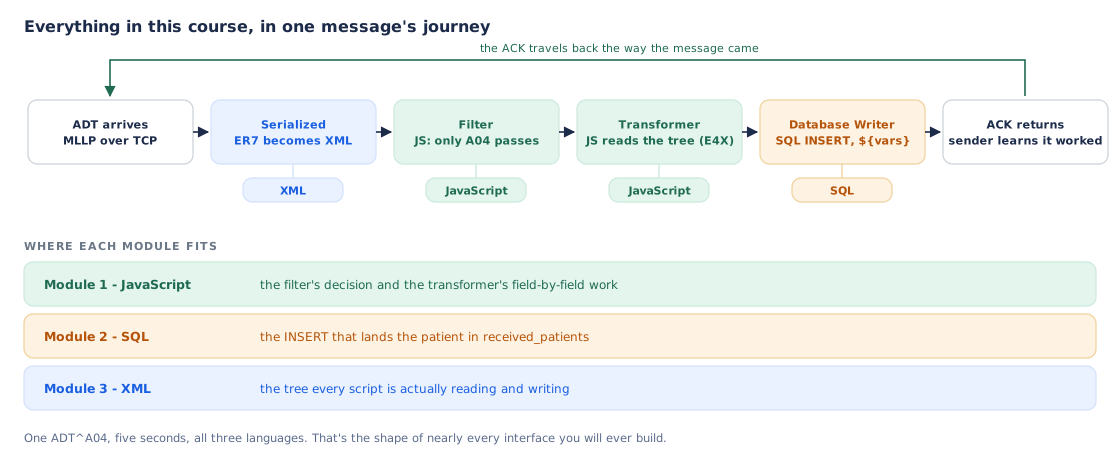
Preview diagram from the course: a message's journey through JavaScript, SQL and XML
DEVELOPMENT

Development Foundations: JavaScript, SQL & XML

The three languages every integration engineer works in, taught from scratch and grounded in real interfaces — the scripts inside the engine, the databases where messages land, and the trees your code walks.

4 modules21 lessons 4 quizzes · 46 questions Pairs with the HL7 courseBeginner-friendly
CURRICULUM PREVIEW
01JavaScript Foundations 8 lessons
  • Why Integration Engineers Write JavaScript
  • Values, Variables & Types
  • Operators & Comparisons
  • Control Flow: If & Else
  • Loops
  • Functions
  • Working with Strings
  • Arrays & Objects
  • QuizJavaScript Foundations Quiz · 14 questions
02SQL Foundations 7 lessons
  • Databases in the Interface World
  • SELECT: Reading Data
  • Filtering & Sorting: WHERE and ORDER BY
  • Writing Data: INSERT, UPDATE, DELETE
  • Joins: Combining Tables
  • Keys, Constraints & NULL
  • SQL from Mirth: Database Reader & Writer
  • QuizSQL Foundations Quiz · 14 questions
03XML Foundations 5 lessons
  • What Is XML?
  • Well-Formed XML: The Rules
  • Trees, Paths & E4X
  • HL7 as XML: How Mirth Sees Your Message
  • XML vs JSON
  • QuizXML Foundations Quiz · 10 questions
04Putting It Together 1 lessons
  • A Message's Journey Through Code
  • QuizDevelopment Final Check · 8 questions

Your own lab — a real engine, not a simulator

Provisioned on demand: the same stack working integration engineers use, private to you.

  • Your own Mirth Connect login — build, deploy, and debug channels in the real Administrator, with your own channel group and MLLP port.
  • A live PostgreSQL schema — patient, referral, and pharmacy tables your channels write to, seeded and private to you.
  • A two-view clinical harness — watch your messages land in an EHR view and a pharmacy view, like the systems on either side of a real interface.
  • An auto-grader — “Check my lab” inspects your database and probes your channel over MLLP: 36 checks across the three labs, plus the capstone build challenge in two variants.
YOUR LAB ENVIRONMENT HL7 sender MLLP · your port Your Mirth channel Mirth Connect 4.5 PostgreSQL your schema EHR view admissions land here Pharmacy view orders close the loop “Check my lab” auto-grader 36 checks · SQL inspection + live MLLP probes

A study plan that lives in your calendar

Sign in with Google, and once you're approved for a course, we build your schedule where you'll actually see it.

  1. Sign up with Google — your Google account is your login; no passwords to manage.
  2. Get approved — request a course; your instructor unlocks it.
  3. Link your calendar — one consent, and we can only touch calendars we create for you, never your own events.
  4. Pick your pace — standard, intensive, or relaxed; choose your study days and time, preview the schedule, done. A dedicated “Study Plan” calendar appears with every session's lessons, labs, and quizzes as a checklist.

Ten weeks from first segment to shipped interface

The standard HL7 Bridge pace: three ~90-minute sessions a week. Intensive and relaxed paces cover the same journey in 6 or 15 weeks.

Wk 1–2
Read HL7 v2
Interoperability, segments, data types, ACKs, patient administration
Wk 3
Go deeper
Level 1 Quiz · CDA & IHE deep dives
Wk 4–5
Meet Mirth
The engine tour, serialization, filters & transformers
Wk 6
First interface
Lab environment · Level 2 Quiz · Lab A: get the patient across
Wk 7
Speak the languages
XML, JavaScript & SQL for integration
Wk 8
Route & reshape
Level 3 Quiz · Lab B · advanced Mirth · Level 4 Quiz
Wk 9
Close the loop
Lab C bidirectional workflow · delivering projects · Level 5 Quiz
Wk 10
Prove it
Review · written exam · capstone build challenge
drag the timeline sideways to see all ten weeks →
Development Foundations: 12 sessions over 4 weeks at the standard pace — recommended before the HL7 course's development module, or alongside weeks 1–6.

Course basics

The ground rules, up front.

Built for beginners

No prior HL7 or programming experience required. The development foundations course starts from zero; the HL7 course teaches every segment it uses.

Learn by doing

Short focused lessons with real Mirth screenshots and diagrams, then labs where you build the actual interface — and an auto-grader tells you exactly what passed.

Quizzes that count

Every module ends in a quiz — pass at 70%, up to 3 attempts. Deep-dive quizzes on CDA and IHE are part of the program, not optional extras.

A capstone that proves it

A written exam plus a build challenge: a fresh spec, a clean schema, and your own channel from scratch — graded live against your database.

Enrollment is personal

Sign up with Google, request a course, and an instructor approves your access. Labs are provisioned per student — real resources, deliberately managed.

Aligned to certification

The HL7 curriculum is mapped against the official Mirth certification exam syllabus — every topic covered, with question banks to match.

Ready to speak HL7 fluently?

Tell us a little about yourself and what you want to learn — we'll get back to you with enrollment details, start dates, and answers to anything you ask.

  • No commitment — this just starts the conversation.
  • We'll match you to a course and a pace that fits.
  • Training and labs run on our private training network; we'll walk you through access.

Register your interest

We only use this to reply to you about the courses.